

Introduction #
What is Dokumentli? #
Dokumentli is a vision-language model (VLM) tuned for extracting information from documents, running on your own hardware. You declare what you want, provide images of the pages, and get the information back in a structured format.
There are no examples to be labeled. Dokumentli reads layouts it has never seen before and does not need to be told where on the page to look. Name the customer reference, the delivery date and the IBAN, and you get all three back together even when the document scatters them across header, body and footer.
Want to get a taste of Dokumentli? Visit the playground.
Why on your hardware? #
Your documents are the sensitive asset. Invoices, contracts, personnel files: documents with the most business value attached are usually the ones that are hardest to send anywhere. Dokumentli is served by the Node, a self-contained Docker container that you can run on your premises. You decide how and where the model is deployed, from an air-gapped datacenter to your cloud provider of choice. Documents stay under your complete control.
Integration #
Stable Interface #
No prompt engineering, and no guessing at how to parse the output. You integrate against a stable interface. Provide a specification of what you want to know:
{"type": "extraction",
 "items":
 {"general": {"type": "group",
              "items": {"invoice_date": {"type": "date"},
                        "invoice_nr":   {"type": "string"}}},
  "line_items": {"type": "group",
                 "cardinality": "many",
                 "items": {"amount":      {"type": "float"},
                           "description": {"type": "string"},
                           "position":    {"type": "int"}}}}}
And Dokumentli returns the extracted values in a structured format:
{"general": {"invoice_date": {"value": "2026-03-14"},
             "invoice_nr":   {"value": "RE-2026-0815"}},
 "line_items": [{"amount":      {"value": "19.90"},
                 "description": {"value": "Widget"},
                 "position":    {"value": "1"}},
                {"amount":      {"value": "99.10"},
                 "description": {"value": "Bolt"},
                 "position":    {"value": "2"}}]}
OpenAI-compatible API #
The interface is built on OpenAI’s chat completions API, a widely adopted standard in the industry. Any OpenAI-compatible SDK or HTTP client works out of the box. You send the page images and the spec as content in your request and read the result out of the response.
import json
from openai import OpenAI

client = OpenAI(base_url="http://localhost:8000/v1")

response = client.chat.completions.create(model="dokumentli",
    messages=[{"role": "user", "content": [
        {"type": "image_url", "image_url": {"url": PAGE}},
        {"type": "text", "text": json.dumps(spec)}]}])

result = json.loads(response.choices[0].message.content)

result["general"]["invoice_nr"]["value"]   # 'RE-2026-0815'
Operations #
How is it deployed? #
You provide the GPU and a system capable of running Docker containers. We provide the model and the container image. It runs anywhere from an air-gapped datacenter to the cloud environment of your choice. The step by step version is in How To: Setup On Prem.
$ docker run -d --gpus all --ipc=host --init -p 8000:8000 \
    -v ./license.lic:/etc/dokumentli/license.lic:ro \
    -v ./weights:/models/dokumentli:ro \
    parashift/dokumentli-node:latest
The Node is meant to fit the IT landscape you already have. Use your existing load balancer, serve the model from your storage system, and monitor the Node with the tools you already run: Prometheus metrics on /metrics and Kubernetes-compatible probes on /health.
One Node per GPU server behind your own load balancer, scraped by your own monitoring, with a single model artifact served from your own storage
Concepts #
This chapter gives you an overview of the concepts and ideas behind Dokumentli.
Spec #
The spec (or specification) is a manifest that you send to the Node, describing what you want to know from a document. It is declarative by nature: you specify what you want as JSON data. Here is an example:
{
  "type": "extraction",
  "items": {
    "invoice_header": {
      "type": "group",
      "items": {
        "customer_id":  {"type": "string"},
        "invoice_nr":   {"type": "string"},
        "invoice_date": {"type": "date"}
      }
    }
  }
}
In the specification you can declare to kind of items, groups and fields. Each item has an identifier, which is how you access the returned values in the result.
Group #
A group is a collection of fields that might be spatially (e.g. an address) or logically (e.g. scattered document metadata) related. The cardinality (one or many) of a group indicates whether you expect one or multiple occurences of it.
Field #
Fields are scalar values in a document: your invoice number or your payment due date. They always belong to a group and are associated with a data type (string, date, int, …).
Result #
The result is the answer to what you asked for in your spec, represented as JSON data. Its structure is based on the groups and fields you declared in the spec.
{
  "invoice_header": {
    "customer_id":  {"value": "C123898"},
    "invoice_nr":   {"value": "RE-2026-0815"},
    "invoice_date": {"value": "2026-03-14"}
  }
}
Guarantees and hints #
The shape of a result is a guarantee. Every identifier you declared is present, nothing you did not declare appears, and a group you declared as repeating appears as a list. This allows you to index into a result without defensive checks.
The guarantee is about the keys you wrote, which is why it can hold across releases: we will neither add nor omit a group relative to your spec. What we can add is more detail inside a value, so read the keys you know and ignore the rest. The Reference states the guarantees normatively.
The content of the values is not a guarantee. Every value arrives as a string, so the type you declare in the spec is a hint that instructs the model on what kind of value to look for, not a guarantee about what data type you get. A value can be empty or carry the page’s own native formatting.
Node #
The Node is the software stack that serves the Dokumentli model and its API. It is distributed as a Docker container that you can run on your own hardware, and provides an OpenAI-compatible HTTP API for interfacing with the model.
Why an existing standard #
There is no bespoke protocol to learn. The Node speaks OpenAI’s Chat Completions API, so the client library, the retry policy and the request logging you already run keep working. The Dokumentli-specific part in a request is the spec. Where that leaves you is a request you can read: an HTTP POST with a JSON payload, simple enough to implement from scratch if you would rather not take a dependency.
The mechanics are in the Reference.
Reference #
Spec #
A spec is a JSON object with a type and items attribute:
{
  "type": "extraction",
  "items": {
    <identifier>: <group>,
    ...
  }
}| Attribute | Description | Data Type | Presence | Default |
|---|---|---|---|---|
type |
Tag indicating that this object is an "extraction" spec. Its value must be "extraction". |
string |
required |
- |
items |
Object representing mapping from identifiers to group declarations | object |
required |
- |
Example:
{
  "type": "extraction",
  "items": {
    "invoice_header": {
      "type": "group",
      "items": {
        "customer_id":  {"type": "string"},
        "invoice_nr":   {"type": "string"},
        "invoice_date": {"type": "date"}
      }
    },
    "line_items": {
      "type": "group",
      "cardinality": "many",
      "items": {
        "description": {"type": "string"},
        "quantity":    {"type": "int"},
        "price":       {"type": "float"}
      }
    },
    "payment_methods": {
      "type": "group",
      "cardinality": "many",
      "items": {
        "iban": {"type": "string"}
      }
    }
  }
}
Group #
A group is a collection of named fields. It is represented as a JSON object with at least two attributes: type and items.
{
  "type": "group",
  "items": {
    <identifier>: <field>,
    ...
  }
}| Attribute | Description | Data Type | Presence | Default |
|---|---|---|---|---|
type |
Tag indicating that this object is a group. Its value must be "group". |
string |
required |
- |
items |
Object representing mapping from identifiers to field declarations | object |
required |
- |
cardinality |
Whether to expect "one" or "many" occurrences of this group. |
string |
optional |
"one" |
Example:
{
  "type": "group",
  "items": {
    "city":    {"type": "string"},
    "street":  {"type": "string"},
    "country": {"type": "string"}
  }
}
Field #
A field is a scalar value from a document. There are many different field types you can request.
{"type": "<field-type>"}| Type | The model looks for | The result value you get |
|---|---|---|
string |
any text | the text as a string |
int |
a whole number | the digits as a string |
float |
a decimal number | the number as a string |
date |
a date | the date as a string |
checkbox |
a tickbox, and whether it is marked | "checked" or "unchecked" |
signature |
a signature line, and whether it is signed | "signed" or "unsigned" |
Naming Conventions #
We recommend using snake_case for field identifiers. This means all characters are lower case and words are connected via underscores _. This is a convention and not strictly enfroced, internal tests show it working best, though.
Result #
The result is a JSON object containing extracted values for a given spec. It matches the structure of groups and fields declared in the spec.
For groups with cardinality "one", the structure is:
{
  <group_identifier>: {
    <field_identifier>: {"value": <value>},
    ...
  }
}
When a field is not present, or could not be extracted, value is an empty string "".
For groups with cardinality "many", the structure is:
{
  <group_identifier>: [
    {
      <field_identifier>: {"value": <value>},
      ...
    },
    ...
  ]
}
When the model did not find a single occurrence of a group, then the group identifier maps to an empty list.
Today value is the only key in a field object, and it is the only one to read. More are coming, so ignore keys you do not recognise rather than assuming the set is closed.
Here is a result for the spec above, from an invoice that printed no customer id and named no payment method:
{
  "invoice_header": {
    "customer_id":  {"value": ""},
    "invoice_nr":   {"value": "RE-2026-0815"},
    "invoice_date": {"value": "2026-03-14"}
  },
  "line_items": [
    {
      "description": {"value": "Widget"},
      "quantity":    {"value": "2"},
      "price":       {"value": "19.90"}
    },
    {
      "description": {"value": "Bolt"},
      "quantity":    {"value": "1"},
      "price":       {"value": "99.10"}
    }
  ],
  "payment_methods": []
}
Fields of type checkbox and signature are special, each having exactly three possible values:
checkbox:"checked","unchecked"or""signature:"signed","unsigned"or""
An unchecked box is not the same as an empty value: the box is on the page and it is not ticked.
Guarantees #
On a response with a 200 status code you can expect that:
Every identifier you declared is present. Nothing is ever omitted, and keys you did not declare never appear.
The keys are yours, in your spelling.
Cardinality holds: a
onegroup is an object and amanygroup a list of such objects. Only fields are wrapped in a value object, never groups.
While the shape is guaranteed, the extracted information is not:
Values may be empty. An empty string means “not found” or “found but empty”. An empty list means nothing was found.
Values are not normalised. A total may arrive as
"1.234,56"or"1,234.56", whichever the page showed.Values may be wrong. The model can misread.
HTTP Interface #
Integrating with Dokumentli works as follows:
- Send a spec and either images of document pages or a pdf as an HTTP request to the Node.
- Get back a chat completions response with the result in it.
One round trip: the page images and the spec go out as the content parts of a single message, and the result comes back as the content of the first choice
The request needs to match the format standardised by OpenAI’s Chat Completions API.
Request #
With Page Images
The recommended way of providing the document content to Dokumentli is through page images in either PNG or JPEG format. For an A4 page we do recommend a resolution of 1800 pixels for the long side. Minimum recommended is 1200 px for any document that contains text.
POST {BASE_URL}/chat/completions
Authorization: Bearer {{API_TOKEN}}
Content-Type: application/json

{
  "model": "dokumentli",
  "messages": [{
    "role": "user",
    "content": [
      {"type": "image_url", "image_url": {"url": "data:image/jpeg;base64,{{PAGE_1_AS_BASE64}}"}},
      {"type": "image_url", "image_url": {"url": "data:image/jpeg;base64,{{PAGE_2_AS_BASE64}}"}},
      {"type": "text", "text": "{{SPEC}}"}
    ]
  }]
}
With a document PDF
The Dokumentli Node also supports processing of PDFs directly. It relies on PDFium as the rendering engine for converting the PDF into the individual page images.
POST {BASE_URL}/chat/completions
Authorization: Bearer {{API_TOKEN}}
Content-Type: application/json

{
  "model": "dokumentli",
  "messages": [{
    "role": "user",
    "content": [
      {"type": "file", "file": {"filename": "{{FILENAME}}","file_data": "data:application/pdf;base64,{{DOCUMENT_PDF_AS_BASE64}}"}},
      {"type": "text", "text": "{{SPEC}}"}
    ]
  }]
}
A request is a single chat message whose content lists the document’s page images first, one image content part per page in reading order, followed by the spec as the last content part.
The Node expects exactly one message with role: "user", a content list holding at least one image part and exactly one text part.
The model supports JPEGs and PNGs. They should be passed as data: URLs, where {{PAGE_1_AS_BASE64}} and {{PAGE_2_AS_BASE64}} are the base64 encoded images, or as any other URL the Node can fetch. Several images are the pages of one document and produce one result.
The spec is sent as one text content part, serialised to a string (see {{SPEC}}).
{{API_TOKEN}} only matters if the Node was started with one. A Node started without a token accepts any placeholder, which is what an SDK that insists on an api_key can send.
Rather than hardcoding a model name, list what the endpoint serves with GET {{BASE_URL}}/models and take the id of the first entry.
Parameters the Node has no interest in (temperature, max_tokens, seed, your own custom fields) are forwarded untouched, and id, model, usage and finish_reason are preserved on the way back. stream is the exception: assembling a result needs the model’s complete answer, so responses are never streamed.
Response #
The endpoint replies with the standard chat completion body. Your result is the string in the content field of the first choice’s message (choices[0].message.content in path notation):
{
  "id": "chatcmpl-a1b2c3d4",
  "object": "chat.completion",
  "created": 1774000000,
  "model": "dokumentli",
  "choices": [
    {
      "index": 0,
      "message": {
        "role": "assistant",
        "content": "{{RESULT}}...."
      },
      "logprobs": null,
      "finish_reason": "stop"
    }
  ],
  "usage": {"prompt_tokens": 1234, "completion_tokens": 56, "total_tokens": 1290}
}
Errors #
Errors arrive in the OpenAI error envelope, which means an official SDK raises them as its own exception types and you can keep the error handling you already have:
{"error": {"message": "items.invoice_nr.type: Input should be 'group'",
"type": "invalid_request_error", "code": null}}| Status | Type | What happened | What to do |
|---|---|---|---|
400 |
invalid_request_error |
Your envelope or your spec is malformed. The message names the exact path. | Fix the request. Retrying will not help. |
401 |
invalid_request_error |
Missing or wrong API token. | Send Authorization: Bearer <token>. |
502 |
api_error |
The model is unreachable or answered unusably. | Retry with backoff. Nothing was committed. |
500 |
internal_error |
The Node broke its own promise: it assembled a result that did not match your spec and refused to ship it. | Report it with the spec that triggered it. This is never your fault. |
A 400 is raised before the model is called, so a malformed spec costs you no inference time. Note also what is not an error: a document the model could not read anything from still answers 200, with empty values. Extraction quality has to be measured, never inferred from the absence of failures.
How To: On-Prem Setup #
Introduction #
This chapter guides you through the setup of a Dokumentli Node on a (remote) Linux machine with access to a GPU. We recommend reading through all 7 steps before starting.
All commands below are to be executed in a shell on the target machine where you run Dokumentli Node. You received the licence.lic file and two download URLs by mail, copy the licence file over to the target server and run the following commands on there afterwards.
The mail arrives on your machine; the licence is copied across, and every setup step runs in a shell on the GPU server
Prerequisites #
To follow this guide, you need a couple skills to achieve the below tasks on the target machine:
- Comfortable interacting with Linux through a shell (e.g. bash).
- Ability to connect to your target machine through SSH
- Copy files to remote system (e.g. sftp, scp, rsync)
- Editing text files through command-line text editor (nano, vim , emacs)
Prerequisites for the target machine:
- A Linux machine with an NVIDIA GPU (>=24 GB VRAM, NVIDIA driver >525)
- 50 GB free disk space, for the model and the Node image
- An OCI container runtime with the NVIDIA Container Toolkit (e.g. Docker)
- A download tool (e.g. curl) to fetch the artifacts
- Python 3 to test the deployed model
Steps #
The following steps are to be run on the target machine.
Step 1: Provide download URLs #
You should have received two download URLs (model and docker image). Paste the two download URLs in the form below: every command on this page is then filled in, ready to copy, versions included. Nothing leaves your browser.
Without JavaScript this is a form you fill in by hand: replace <MODEL_URL> and <NODE_IMAGE_URL> with the two URLs from your welcome mail, and <MODEL_VERSION> and <NODE_VERSION> with the version numbers in their filenames.
Step 2: Copy license file #
We also sent you a license file, which is required to launch a Node instance. Copy the license file as license.lic to the target system (scp, copy-paste, etc.).
Step 3: Download the artifacts #
The model and the image are large, so the first two will take a while. The examples archive is small, and holds the scripts, the extraction spec and a test document.
$ curl -O <MODEL_URL>
$ curl -O <NODE_IMAGE_URL>
$ curl -O https://dokumentli-docs.parashift.io/dokumentli-examples.tar.gz
Step 4: Unpack the archives #
Unpacking the model creates dokumentli-model-<MODEL_VERSION>/ with the model data, and unpacking the examples creates dokumentli-examples/ with the scripts and the test document.
$ tar xf dokumentli-model-<MODEL_VERSION>.tar.gz
$ tar xf dokumentli-examples.tar.gz
Step 5: Load the Node image #
The archive is a saved Docker image. Load it into your local registry:
$ docker load -i dokumentli-node-<NODE_VERSION>.tar.gzLoaded image: parashift/dokumentli-node:<NODE_VERSION>The name docker load prints is the one Step 6 runs. It comes from inside the archive rather than from its filename, so if the two ever disagree, believe this line.
Step 6: Start the Node #
You now have the three things the container needs, all in this directory: the image, the model directory and the license file.
$ docker run -d --name dokumentli-node \
     --gpus all --ipc=host -p 8000:8000 \
     -e DOKUMENTLI_GPU_MEMORY_UTILIZATION=0.85 \
     -v ./license.lic:/etc/dokumentli/license.lic:ro \
     -v ./dokumentli-model-<MODEL_VERSION>:/models/dokumentli:ro \
     parashift/dokumentli-node:<NODE_VERSION>
Loading the model takes a couple of minutes. Follow the logs until “vLLM is ready” appears, then press Ctrl+C to stop tailing them.
$ docker logs -f dokumentli-node
INFO     dokumentli.license: license accepted: Acme AG (perpetual)
INFO     dokumentli.supervisor: launching vLLM: vllm serve /models/dokumentli ...
INFO     dokumentli.supervisor: vLLM is ready
Then verify that the GET /health endpoint reports the model as running:
$ curl -s http://localhost:8000/health{"status":"ok","model":"running"}Step 7: Test the model #
Run smoke.py from the examples archive. It asks for a single field from example-letter.jpeg, which sits beside it, so an answer means the whole path works: the request envelope, the license, the model on the GPU, and a result in the shape the spec declared.
$ cd dokumentli-examples
$ python3 smoke.py
{"general_info": {"customer_nr": {"value": "41554441"}}}If it fails instead, what it prints is the Node’s own error, and Errors says what each status means.
Where next #
You have a working Node. The Tutorial walks through a real use case with it, using the same two scripts you just unpacked.
Tutorial: Information Extraction #
Introduction #
This chapter will demonstrate how Dokumentli can be used to extract information from an example letter. We will first look at the document itself and the corresponding extraction specification (spec). Then the request that carries them, the response that comes back, and the result you can expect. And finally, an example implementation of a use case in Python.
It is recommended to read through the chapter in its entirety first. Then, in a second step, try to implement it yourself.
You can find all relevant files in the examples archive: it contains the letter as example-letter.jpeg, the spec as spec.json, and the two Python scripts example.py and example_openai.py. To download it, run:
$ curl -O https://dokumentli-docs.parashift.io/dokumentli-examples.tar.gz
$ tar xf dokumentli-examples.tar.gz
The document #
We extract a handful of fields from the letter below. Like most business documents, it carries a few distinct groups of information, which we want captured as structured data.
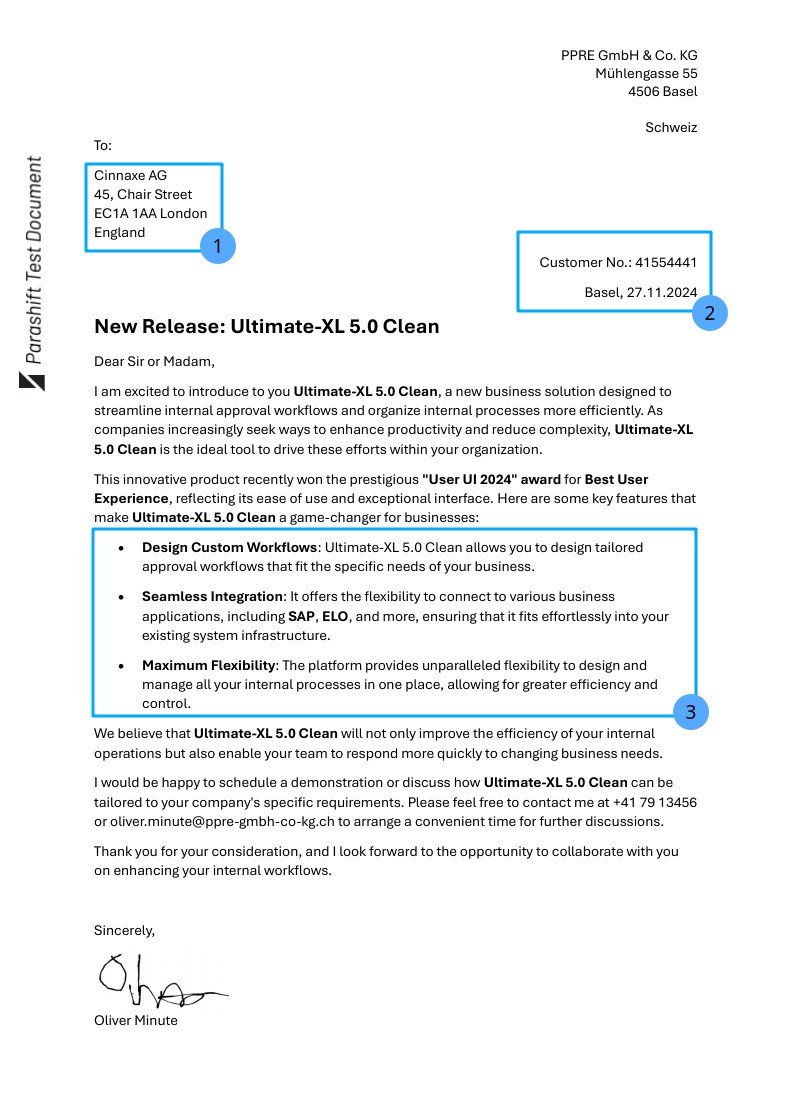
The groups we are after are the following:
client_address: who received the documentgeneral_info: document date, customer numbernew_features: the highlighted features, one entry each
The specification #
Dokumentli requires a specification (or spec) that declares what groups and fields we want to know from a document. Here is the spec for the groups we listed in the previous section:
{
  "type": "extraction",
  "items": {
    "client_address": {
      "type": "group",
      "items": {
        "company_name": {
          "type": "string"
        },
        "street": {
          "type": "string"
        },
        "house_number": {
          "type": "string"
        },
        "postal_code": {
          "type": "string"
        },
        "city": {
          "type": "string"
        },
        "country": {
          "type": "string"
        }
      }
    },
    "general_info": {
      "type": "group",
      "items": {
        "document_date": {
          "type": "date"
        },
        "customer_nr": {
          "type": "string"
        }
      }
    },
    "new_features": {
      "type": "group",
      "cardinality": "many",
      "items": {
        "title_boldface": {
          "type": "string"
        },
        "description": {
          "type": "string"
        }
      }
    }
  }
}
The three groups become the three entries of items in the extraction spec. Each group holds one or more fields. Fields are declared with the data type, dates are declared as date, we also support int & float for numeric values. This tells the model what kind of mark to look for and how to format the output. new_features repeat and hence declare cardinality: "many". The corresponding spec is provided as spec.json in the examples archive.
The request #
The spec together with the page images of the document has to be sent to the Dokumentli Node as an HTTP request. The Node speaks OpenAI’s Chat Completions HTTP API and expects your payload to conform to it, with the images in either JPEG or PNG. The request has to be sent to /v1/chat/completions of your Dokumentli Node as a POST request:
{
  "model": "dokumentli",
  "messages": [{
    "role": "user",
    "content": [
      {"type": "image_url", "image_url": {"url": "data:image/jpeg;base64,{IMAGE_AS_BASE64}"}},
      {"type": "text", "text": "{\"type\": \"extraction\", \"items\": {\"client_address\": ..."}
    ]
  }]
}
In the Chat Completions terminology the request contains a single “message” with role: "user". That message has one or more “image content parts”, one per page, and a single “text content part” holding the spec.
The ordering matters: provide the images in ascending page order first, followed by the spec.
Each image content part carries a data URL with the correct MIME type and the base64-encoded bytes of the image ({IMAGE_AS_BASE64} below is a placeholder for those bytes):
{"type": "image_url", "image_url": {"url": "data:image/jpeg;base64,{IMAGE_AS_BASE64}"}}The text content part carries the spec as a serialised JSON string, escaped like any other JSON string: do not inline it as a nested object.
{"type": "text", "text": "{\"type\": \"extraction\", \"items\": {\"client_address\": ..."}The response #
The endpoint replies with the standard chat completion body, the same envelope any OpenAI-compatible model returns. The result is the string in the content field of the first choice’s message:
{
  "id": "chatcmpl-a1b2c3d4",
  "object": "chat.completion",
  "created": 1774000000,
  "model": "dokumentli",
  "choices": [
    {
      "index": 0,
      "message": {
        "role": "assistant",
        "content": "{\"client_address\": {\"company_name\": {\"value\": \"Cinnaxe AG ...\"}}, ...}"
      },
      "logprobs": null,
      "finish_reason": "stop"
    }
  ],
  "usage": {"prompt_tokens": 1234, "completion_tokens": 56, "total_tokens": 1290}
}
Everything outside choices[0].message.content is envelope: useful for logging and cost tracking, but not what you came for. Parse that one string and you have the result described in the next section. An official SDK gives you the same path as response.choices[0].message.content.
The result #
The result you get back is a JSON object with the three identifiers of the spec. The many group comes back as list of three new_features. Every field is a {"value": ...} object holding a string, exactly as the page spelled it. Note that the data type you provided in the spec acts only as context for the model: the returned value is always a string.
{
  "client_address": {
    "company_name": {"value": "Cinnaxe AG"},
    "street": {"value": "Chair Street"},
    "house_number": {"value": "45"},
    "postal_code": {"value": "EC1A 1AA"},
    "city": {"value": "London"},
    "country": {"value": "England"}
  },
  "general_info": {
    "document_date": {"value": "2024-11-27"},
    "customer_nr": {"value": "41554441"}
  },
  "new_features": [
    {
      "title_boldface": {"value": "Design Custom Workflows:"},
      "description": {"value": "Ultimate-XL 5.0 Clean allows you to design tailored approval workflows that fit the specific needs of your business."}
    },
    {
      "title_boldface": {"value": "Seamless Integration:"},
      "description": {"value": "It offers the flexibility to connect to various business applications, including SAP, ELO, and more, ensuring that it fits effortlessly into your existing system infrastructure."}
    },
    {
      "title_boldface": {"value": "Maximum Flexibility:"},
      "description": {"value": "The platform provides unparalleled flexibility to design and manage all your internal processes in one place, allowing for greater efficiency and control."}
    }
  ]
}
Your turn #
By now you should have a rough idea of what interacting with the Dokumentli Node looks like. It is time to get your hands dirty. In the examples archive you find a Python script example.py that sends the letter with the very spec you have now seen to the Dokumentli Node.
The script requires Python 3 and expects the Node to be reachable at the BASE_URL set near the top of the file (http://localhost:8000/v1 by default). Run it from the folder you unpacked the examples archive into, so that example-letter.jpeg and spec.json sit next to the script itself:
$ cd dokumentli-examples
$ python3 example.py
The script should print the values Dokumentli extracted from the letter to your console. Here are some small exercises to get further hands-on experience:
Run the script as it is, and check whether the values it prints are the ones on the letter.
Can you adjust the existing
spec.jsonto also extract the name of the person who signed the letter? The Reference describes the structure of the spec.Swap
example-letter.jpegwith an image from one of your own documents and see what happens.Provide your own image and write your own specification. Does the model return what you expect? Checkout our playground to iteratively build up your spec until it is ready.
Happy Hacking!